

Head of Back-end Development
With over 20 years of experience in web development, Andy leads our back-end team, shaping the technical direction of our most complex builds.
8 things you didn't know you could do in Drupal
8 things you didn't know you could do in Drupal

Written by Andy Whale, Head of Back-end Development
CMS —
Jump to contentDrupal can do a lot more than you might expect. Here are some lesser-known features that could save your content team hours of work.
At our latest Great Digital for Good Conference, we asked delegates from purpose-driven organisations to imagine tools that would save them time or make their working lives drastically better. The responses surprised us. Often, delegates were dreaming up tools that already exist in Drupal or can be built with the right configuration and modules. It made us realise there was a disconnect. Often, content teams don’t realise the power of their CMS and are only using a fraction of its functionality.
There’s actually a huge amount of value waiting to be unlocked by explaining how content teams can solve these problems, so here are eight capabilities that could transform how your content team works:
"Where's the latest version of the logo?" is a question that echoes through offices everywhere. Multiple versions scattered across shared drives, email attachments, and individual desktops lead to inconsistent brand representation and wasted time hunting for the right file.
Drupal's Media Library solves this elegantly. Rather than treating logos as just another image upload, you can create a dedicated 'Logos' media type with its own metadata fields for variations (colour, mono, reversed), file formats, and usage guidelines. Alternatively, you can use media categories to tag and filter assets, making it simple for content editors to find exactly what they need.
The real power comes from reusability. Once you have a dedicated media type for logos in the Media Library, it becomes a single source of truth.
Stale content is a silent problem. Pages published years ago quietly fall out of date, eroding trust with users who encounter incorrect information. The challenge is that with thousands of pages, nobody has time to manually audit everything.
Drupal's Content Notify module can automatically flag content that hasn't been reviewed for a specified period. We typically configure this to add a dashboard to the content view that lists all pages needing review, making it immediately visible which content requires attention. The module tracks when content was last reviewed (not just edited) and alerts the relevant content owners when their pages are due for a check.
Email notifications are available too, though we often find that a prominent dashboard works better, as it avoids notification fatigue whilst keeping the review queue front of mind for content teams.
Maintaining consistent tone of voice across a large website is genuinely difficult. Brand guidelines might specify that content should be "warm but professional" or "authoritative yet approachable", but these subjective qualities are hard to police at scale, especially when multiple content editors are contributing.
We've built an AI-powered tool in Drupal that analyses content against your brand's tone of voice guidelines and target audience. It doesn't just flag problems; it suggests specific changes to bring the content in line with your desired style. The key is that this happens within the CMS editing interface, so content editors can review the suggestions and decide what to accept or modify. There's always a human in the loop, using AI to augment rather than replace their judgement.
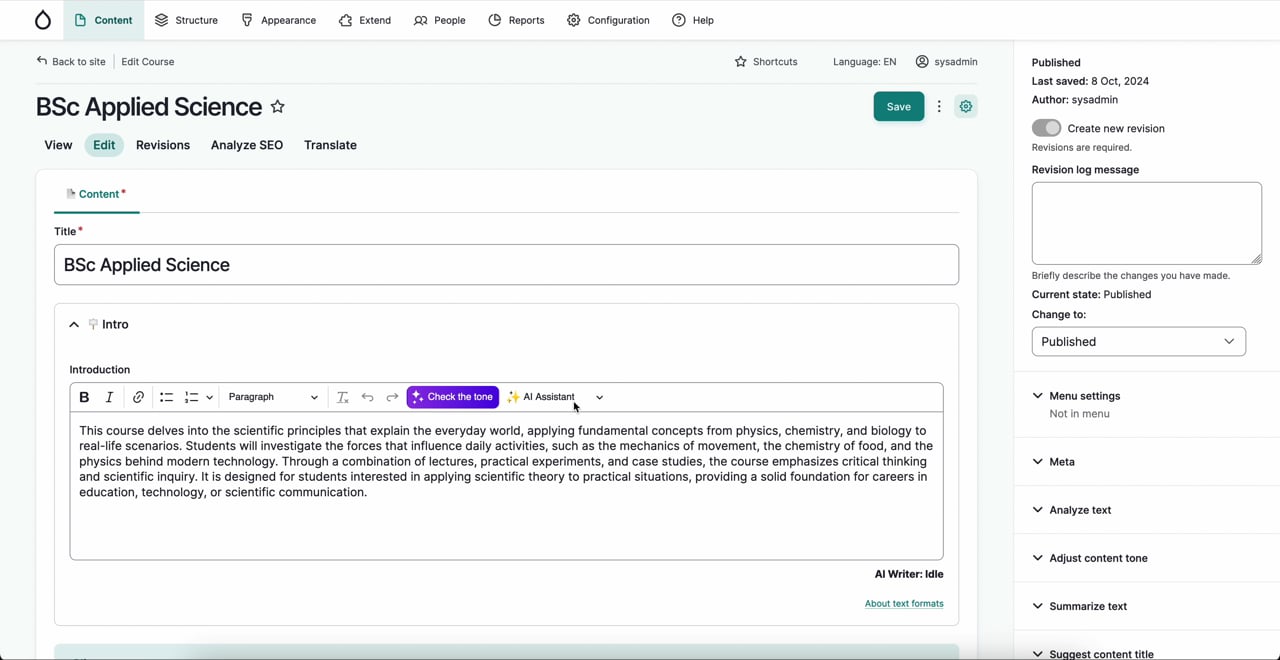
Every piece of content comes with administrative overhead: writing multiple summary versions for different contexts, selecting relevant taxonomy tags, crafting image alt text. These tasks are repetitive, time-consuming, and frankly a bit tedious, which means they often get rushed or skipped entirely.
Our suite of AI tools in Drupal tackles each of these. The AI Tag Suggest tool reads your content and automatically selects relevant tags from your existing taxonomy. AI Summary Suggest generates summaries to your specified character limits, perfect for meta descriptions and content teasers. AI Image Alt Text analyses uploaded images and suggests appropriate descriptions for screen readers.
In each case, the AI populates the relevant field with a suggestion, but the content editor reviews and approves it before publishing. If the AI gets something wrong, they simply edit the suggestion. This approach gives you the speed benefits of automation whilst maintaining quality control. For an overview of all these tools, see our article on AI tools for content teams.
Many organisations, especially research bodies or think tanks, still create content as PDFs first, then struggle to keep website and PDF versions in sync. The PDF becomes outdated, users download incorrect information, and content teams waste hours maintaining duplicate versions.
A better approach is web-first: create the content as a webpage, making it the single source of truth, then offer a PDF download that's generated automatically from the web version. That way the PDF always matches the updated web content. We use a service called Gotenberg, which sits in the back end and generates high-quality PDFs from your web pages on demand. When someone clicks 'Download as PDF', they get a professionally formatted document that's always current because it's generated from the live page.
This isn't out-of-the-box Drupal functionality, but it's something we've built for clients who need it, such as the Joseph Rowntree Foundation. The benefits extend beyond just saving time; web content is more accessible, more searchable, and easier to update than PDFs buried in document repositories.
"We have the same information in twelve different places, and updating it means editing twelve pages." This is one of the most common frustrations we hear from content teams. Whether it's fees and funding information, contact details, or standard disclaimers, duplicated content creates maintenance nightmares.
Drupal offers several approaches depending on your needs. For reusable content components, like a 'Fees and Funding' section that appears across many pages, we use a module called Paragraphs Library. This lets you create a component once and reference it from multiple pages. When you update the original, the changes cascade everywhere it's used.
For smaller pieces of reusable text within your content, we've built a 'snippets' system for some of our clients. This allows you to insert dynamic text variables into your content editor that pull from a central source. At the University of Oxford, for example, we use this for frequently updated information like English language proficiency requirements, application process explanations, and faculty-specific details. Content editors update the snippet once, and every page using it reflects the change.
Accessibility isn't optional; it's a legal requirement for public sector organisations and increasingly expected by users everywhere. But manually checking every page for accessibility issues is impractical, and problems can easily slip through when multiple editors are creating content.
We can integrate Silktide, a comprehensive accessibility testing platform, directly with Drupal. This integration means that when you publish or update content, Silktide automatically tests the affected pages. If it finds issues like missing alt text, poor colour contrast, or problematic heading structures, these appear in your Silktide dashboard for remediation. You can even click through directly from Silktide to the Drupal edit page to fix the problem.
Getting stakeholder feedback on draft content often involves clunky workflows: exporting to Word, emailing documents around, then manually incorporating tracked changes back into the CMS. It's inefficient and error-prone.
CKEditor 5’s premium features bring Word-style collaboration directly into Drupal's text editor. The ‘Comments’ feature lets reviewers add inline comments to specific text, with full threading for discussions. Track Changes shows suggested edits that can be accepted or rejected, maintaining a clear audit trail of who changed what. These features work within the CMS, so there's no need to export content for review.
This is particularly valuable for organisations with governance requirements around content approval, as it keeps the entire review process contained within Drupal where it can be properly managed and documented.
The common thread running through these features is efficiency: helping content teams spend less time on administrative busywork and more time creating valuable content. Drupal's flexibility means that many of these capabilities can be configured out of the box, whilst others require custom development to match your specific workflows.
If any of these features would help your content team, we'd love to discuss how they could work for your organisation. Some require the latest version of Drupal, whilst others can be added to existing installations. The starting point is understanding your current pain points and designing solutions around how your team actually works.
Get in touch via [email protected] to explore what's possible.
Head of Back-end Development
With over 20 years of experience in web development, Andy leads our back-end team, shaping the technical direction of our most complex builds.