

Marketing Lead
With a passion for purpose-driven marketing, Rob leads our marketing team, shaping the strategy behind Numiko's growth.
Why accessibility benefits everyone
Why accessibility benefits everyone

Written by Rob Allen, Marketing Lead
UX & Design —
Jump to content
Web accessibility isn't a compliance exercise, it's an opportunity to make websites better for everyone.
Web accessibility means designing and building websites so that people with disabilities can perceive, understand, navigate and interact with them effectively. All public sector websites are required to meet WCAG 2.2 AA standards, and the Equality Act of 2010 introduced a broader requirement for all organisations to make reasonable adjustments for disabled users.
Meeting these standards is essential, but if accessibility is treated purely as a compliance exercise, organisations miss the bigger picture. The changes that accessibility requires, such as clearer structure, simpler navigation, better written content and more considered design, don’t just help disabled users, they make the experience better for everyone. Accessibility can be so much more than a checklist to ensure you’re compliant. It can be a lens through which to create genuinely better digital experiences. That’s how we approach accessibility projects here at Numiko. In this article, we’ll take you through why accessibility projects can help all users, how to approach them, and how to get buy-in for investment in accessibility.
Accessibility initiatives having wider benefits is such a common phenomenon it actually has a name. It’s known as the ‘curb cut effect’, and it refers to the small ramps built into pavements to help wheelchair users navigate street corners. Once installed, these ramps were quickly adopted by parents with pushchairs, cyclists, delivery workers and travellers with suitcases. A feature designed for a specific group turned out to improve things for everyone. Curb cuts are now ubiquitous and no longer widely recognised as a disability-accessibility feature, but it was accessibility needs that led to their creation.
The same principle applies to the web. Captions on videos were introduced for deaf and hard-of-hearing users, but they’re now used constantly by people watching content on mute, by non-native speakers, and by anyone who finds it easier to read along. Colour contrast requirements, intended for users with low vision, produce text that’s easier to read in bright sunlight, on cheap screens, or when you’re simply tired. When you design for the edges, you almost always improve the centre.
According to the Family Resources Survey 2023/24, 16.8 million people in the UK have a disability. That’s one in four of the population, and the figure is rising. And this only captures permanent disabilities. At any given time, countless more people experience temporary or situational impairments: a broken arm, a migraine, using a phone one-handed, or trying to read a screen in bright sunlight. Accessibility improvements serve all of these people.
For organisations looking to grow their reach, this matters. If a quarter of your potential audience encounters barriers on your website, that’s a significant number of people who may never complete a booking, make a donation, or find the information they came for. Removing those barriers opens the door to a wider audience and reduces pressure on support teams, because people can find answers for themselves.
Websites tend to bloat over time. Pages accumulate, navigation grows complex, and features get bolted on without anyone reassessing whether the overall experience still makes sense. Accessibility work forces that reassessment. When you audit a site for accessibility, you inevitably encounter cluttered layouts, confusing navigation, and content that’s grown unwieldy. The process of making things accessible can open the door to simplification, and that benefits all users.
Accessibility guidelines push teams to use proper heading hierarchies, descriptive link text, plain language and logical page structures. For screen reader users, this is essential. But these same improvements make content far easier to scan for sighted users too. Research by the Nielsen Norman Group found that users typically read web content in an F-shaped pattern, scanning headings and the first few words of each section before deciding whether to read further. When your page structure is clear and well-labelled, users find what they need. When it isn’t, they leave.
This matters especially for transactional journeys. For many organisations, the website is where people take action: booking tickets, making donations, registering for events, or applying for services. If a booking form can’t be navigated by keyboard, or if error messages aren’t announced to screen readers, or if small print has insufficient contrast, some users will simply abandon the process. But the fixes for these issues, such as clear form labels, logical tab order, visible focus states and meaningful error messages, don’t just help users with assistive technology. They reduce friction for every person completing the journey.
Search engines crawl a website in much the same way a screen reader does: they parse the HTML structure, read heading hierarchies, interpret alt text on images, and follow descriptive link text. A site that’s well-structured for accessibility is, by its nature, well-structured for search. Descriptive alt text improves image search rankings. Semantic HTML gives search engines a clear signal about your content’s topic focus. Descriptive link labels like “download the annual report” tell both users and crawlers what a linked resource contains.
This alignment extends to Generative Engine Optimisation (GEO), the emerging discipline of making content discoverable by AI tools like ChatGPT and Google’s AI Overviews. These tools rely on well-structured, clearly written content to generate answers. The same qualities that make a page accessible, such as logical structure, plain language, clear headings and proper markup, also make it easier for AI to parse, understand and cite. If your content works for a screen reader, it’s more likely to work for an AI search engine too. This all means that your accessibility initiatives may well help you get more organic search traffic and be more frequently cited by AI models.
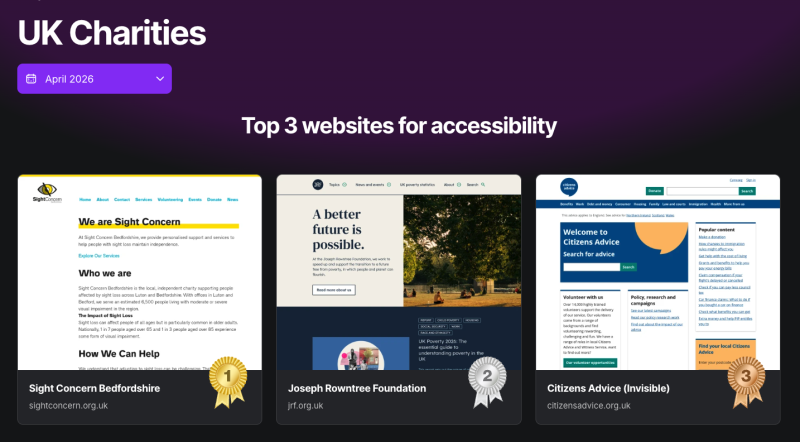
Despite all these benefits, accessibility is still frequently deprioritised. Part of the reason is framing. When it’s presented solely as a legal obligation, it’s easy for stakeholders to treat it as a box to tick. The most successful projects we’ve seen have had internal champions who reframed the conversation. Our work with the Joseph Rowntree Foundation is a good example. Internal advocates made accessibility part of the digital strategy from the outset, ensuring the website was built to be highly accessible as a core design principle, not a retrofit. The result was a site that has been assessed as one of the most accessible charity websites in the UK by the Silktide Index.
If you’re making the case for accessibility investment, connect it to outcomes that matter for your organisation: You’re reaching a quarter of the population who might otherwise be excluded. You’re improving SEO and visibility in AI search results. You’re simplifying your site in ways that improve conversion rates for all users. Framed this way, accessibility stops being a cost centre and starts looking like one of the highest-impact investments you can make.
If accessibility hasn’t been a priority, starting doesn’t require a wholesale rebuild. Begin with an audit to understand where the most significant barriers are. Conduct user testing with people with accessibility needs to identify issues that automated tools can’t catch. And start thinking of accessibility not as an overhead, but as a design philosophy that improves everything it touches.
We’ve designed and built highly accessible websites for organisations including the British Museum, Ofgem, Royal College of Veterinary Surgeons, the Joseph Rowntree Foundation and many more. If you’d like help making your website more accessible, get in touch. We’d love to talk.
Marketing Lead
With a passion for purpose-driven marketing, Rob leads our marketing team, shaping the strategy behind Numiko's growth.